It's Not Too Late to Listen to the October Trilogy
Terrific Albums for the Autumn
For any Norwegians reading this, this recommendation will be categorised as very cliché. But clichés are just that for a reason – and if you haven’t listened to these albums, you’re in for a treat.

The albums I’m referring to, are the following, by the Norwegian artist Thomas Dybdahl:
- … That Great October Sound (2001)
- Stray Dogs (2003)
- One Day You’ll Dance for Me, New York City (2004)
They were all released in October, and are the perfect companions to wool jumpers, a fireplace, and warm soup. But I get that listening to three albums is a big ask. So as a taste, you can listen to his shortest song, which is also one of my favourites: Dice
A Shortcut for Automatic Mac Dock Changes
For When You Switch Between Screen Sizes
I switch a lot between using my MacBook as a laptop, and in clamshell mode in my office. And in general, I keep every setting the same between the setups. However, I have different dock preferences:
- While in laptop mode, I want it at the bottom, with automatic hiding.
- But while on my 27" external display, I want it to be on the left, smaller, and always showing.
The great Rafael Conde has made a solution, with his app HiDock. But sadly, in my experience, it’s simply not stable enough (probably due to some esoteric macOS restrictions) – so I’ve made a crude shortcut to replace it. But before the guide to try it out for yourself, a little thing I recommend you paste into your terminal:
defaults write com.apple.dock autohide-delay -float 0;
defaults write com.apple.dock autohide-time-modifier -int 1 ;
killall Dock
First, create shortcuts for setting the different preferences
Waste Your Money on Things That Last
A Defence of Buying Things
A couple of years ago, I was working full time as a teacher. And even though the pay in that profession is far too low, I was still quite comfortable (economically). However, the last few years, I’ve had way less spending power. I wanted to take a master’s degree, which (sadly, and luckily) led to my mind sort of rupturing, and me getting diagnosed with ADHD.1 Now I’m learning how I really work, while trying to get a freelance lifestyle up and running. I’m lucky in that I know that I can get a teacher job if I like (and need) to.2 And even luckier: I’m in a position where I can survive on less income for a while. So, we’ll see what the future holds – but nonetheless: Currently, I don’t have a lot of money to waste.
Some notes on privilege:
I live in a wealthy country, with plenty of social security, and come from a middle-class background. And the reason I talk about 'not having money to waste' instead of 'being poor' (even though I don't have a lot of income), is that I still have everything I need (and more). After all, this post is about being in the position of having money to waste! So I do know that I'm very privileged. However, I hope the principles I'm trying to get across can be relevant for several levels of affluence.
I’m not saying it’s wrong to spend your money on things like holidays and experiences. And you can absolutely argue that these things last in their own way! But I just wanted to give a little shout-out to something I feel like gets recommended less than those.
Pre-purchased luxury
How to Change macOS Keyboard Shortcuts for Window Management
Or Any Other Keyboard Shortcut, for That Matter (With Extra Added Fun for Multilingual Users)
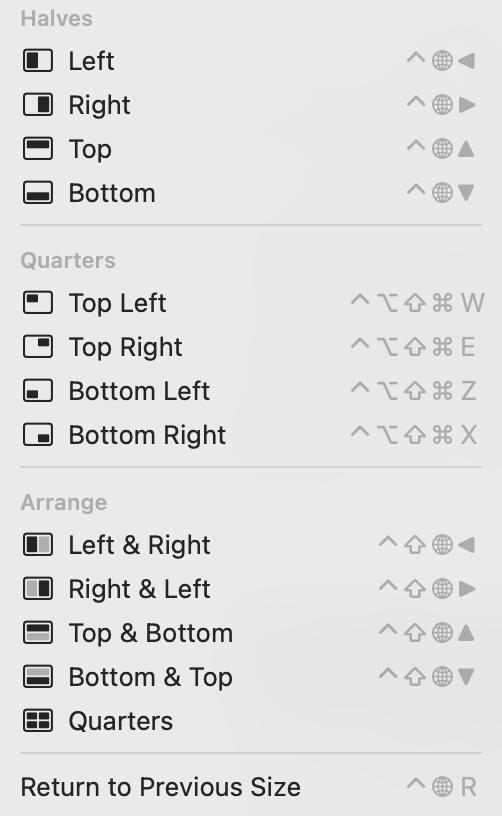
This year, Apple decided to upgrade the default window management on macOS, from terrible to OK. However, I’ve heard some complaints about the keyboard shortcuts, as they use the Globe key, which can cause some problems if you want to automate the hotkeys somehow.
But I have good news: You can change these, and any* other, keyboard shortcuts!
16/10-24: Now updated to work with weird apps, like Discord!
Here’s (one way) how:
If you go into the System Settings app, hit Keyboard and then the button Keyboard Shortcuts…, you’ll open up a screen. In this, you can then hit App Shortcuts to come here:
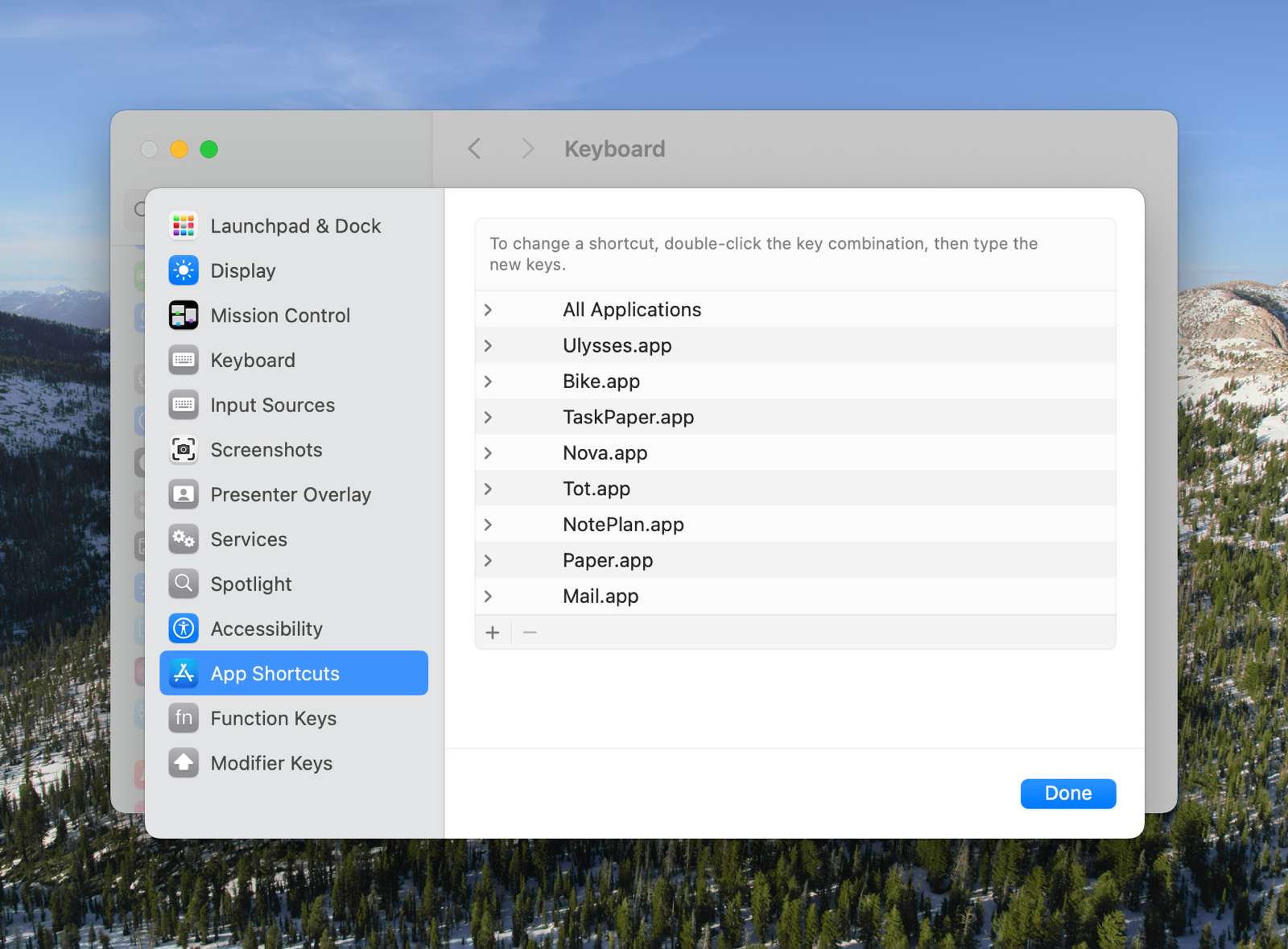
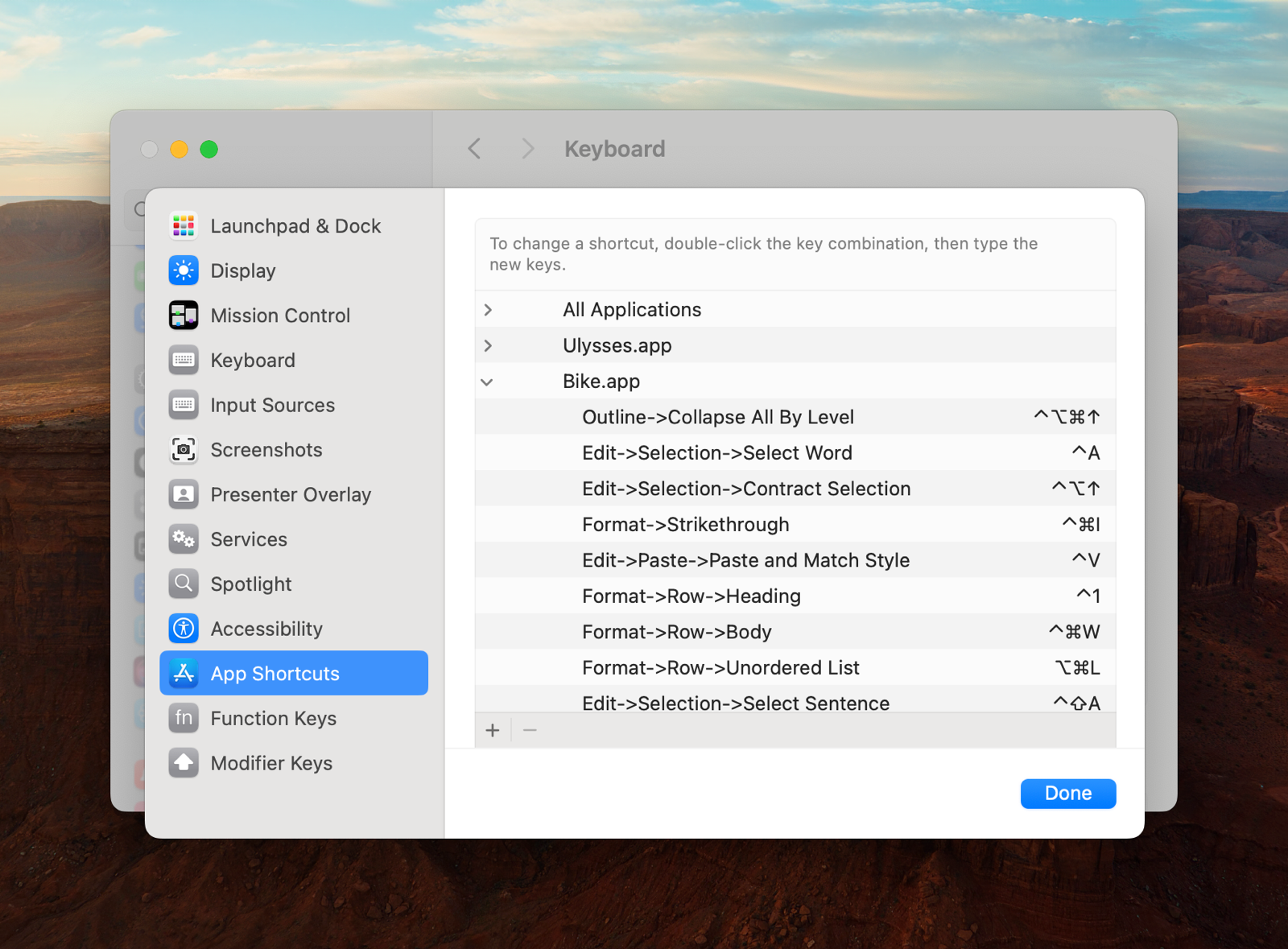
This screen is for changing the keyboard shortcuts to the items in your menu bar (or adding to those who don’t have one already), like those shown in this image:
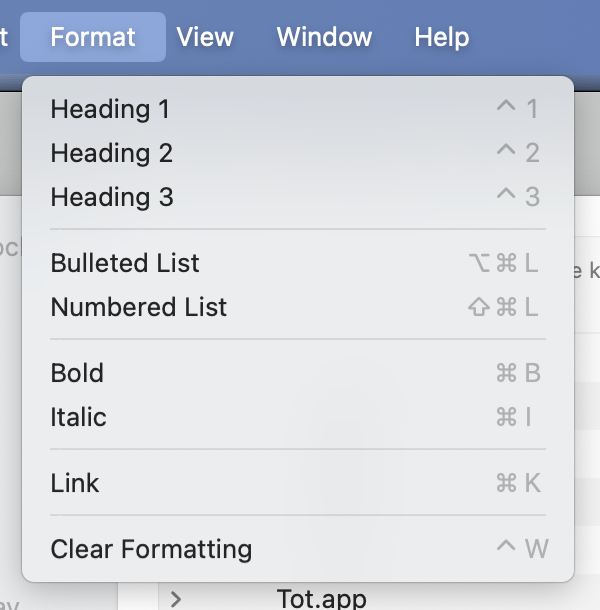
You can either add them only to specific apps (like you can see I’ve done), or to All Applications – and when we’re dealing with this window management, we need to do the latter.
Hitting + gives us this screen:
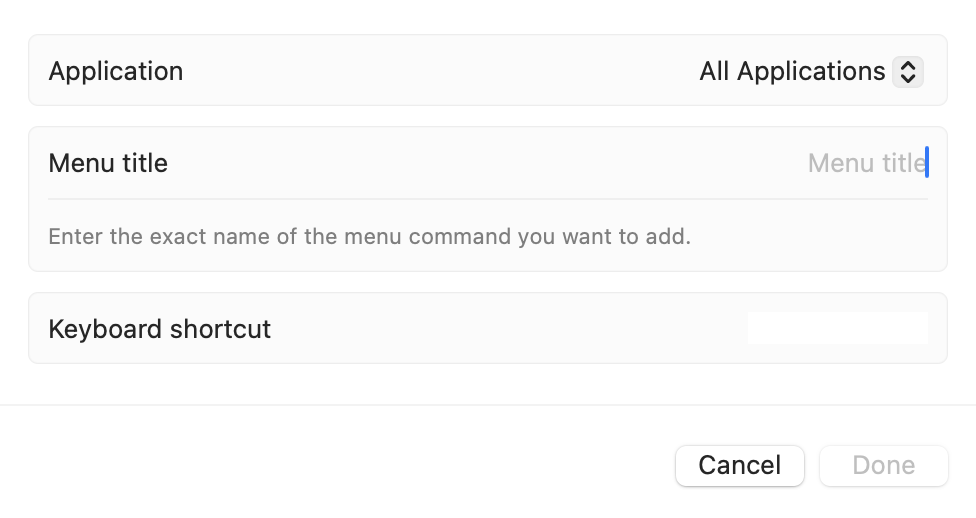
When writing the menu title, you have to be very specific. Here’s what it could look like: Format->Bulleted List
The spelling and capitalisation has to be exact – and you need to separate levels with a - and > and no spaces.
Here’s what it looks like if I want to set a hotkey for tiling a window top left:
Window->Move & Resize->Top Left
As the option sits two levels deep, I have to add a bit more – but it works!
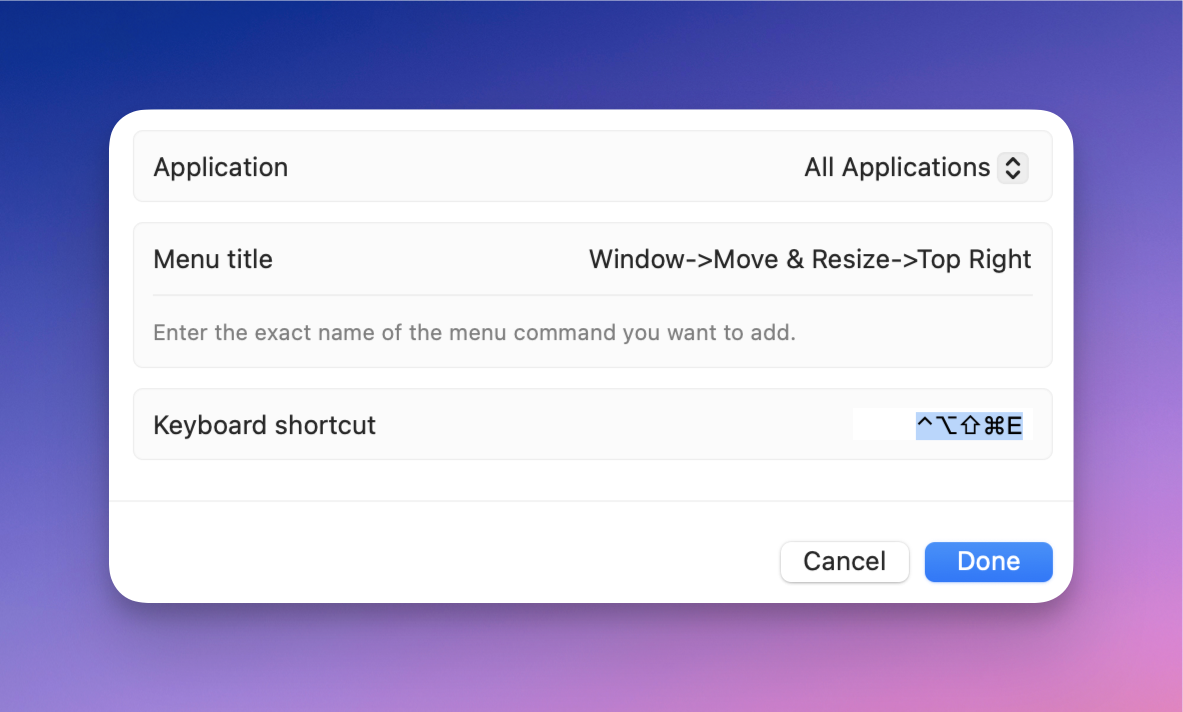
Yes, the hotkey is Shift + Ctrl + Optn + Cmd + E, heh. But I use Karabiner-Elements to set up Caps Lock as all of those keys at once.1 Doing that creates a separate modifier, not used by any apps. A word for this, is Hyperkey, and it’s sometimes denoted by this symbol: ✦
The easiest way to set it up is probably with this little utility by Ryan Hanson, and I greatly recommend doing it.
I go more into how I manage windows here – but this is the short version:
- I always resize with just my left hand
- I’ve made a “grid” that uses Hyperkey (Caps Lock) + a letter:
WandEis Top Left Quarter and Top Right QuarterAis Left Half,Sis Maximise/Fill, andDis Right HalfZandXis Bottom Left Quarter and Bottom Right Quarter
The grid isn’t perfect, as I couldn’t set Hyper + Q as a hotkey, and I like to keep Hyper + C as OCR Copy. But I still really recommend this setup! For the rare cases I need something else, I use Lasso (launced with Hyper + Space).
Cons of the System Settings method:
- Pretty fiddly – you can’t even paste text, as it will think you’re trying to set
Command + Vas the hotkey - Doesn’t get backed up – you have to do it again if you reinstall macOS (Pro tip: Take a screenshot to “back up”!)
- Only works on menu bar items
Pros of the System Settings method:
- Works without third-party software
- Will change the displayed hotkey in the menu bar – making it easier to remember
An alternative: Keyboard Maestro
Big Milestone for Me: First One-a-Month Member
My little blog is added to the One-a-Month Club’s website. It’s “[a] collection of blogs and other web projects that make supporting them both simple and inexpensive by offering access to everything for as little as $1 per month.” The site is run by the excellent Jarrod over at Hey Dingus, and inspired by Manuel Moreale:
But I recently realised that tiers are the wrong approach. At least for me. I believe in kindness. I believe that if you decide to support something I do, you should get all the benefits, no matter how much you pay.
I also realised that 1$+/month is the best price possible when it comes to supporting online creators. The 1 part means you can set it up and forget about it because it’s a low enough amount that won’t make too much of a difference for the majority of people who are considering supporting online creators. The + part allows you to contribute more if you want to do so. And that’s just perfect.
And recently, I achieved two milestones is one, thanks to Numeric Citizen: Get a mention on a blog I follow, and my first donation.1
App Review: Paper
The Expensive, but Best, Place to Write Markdown
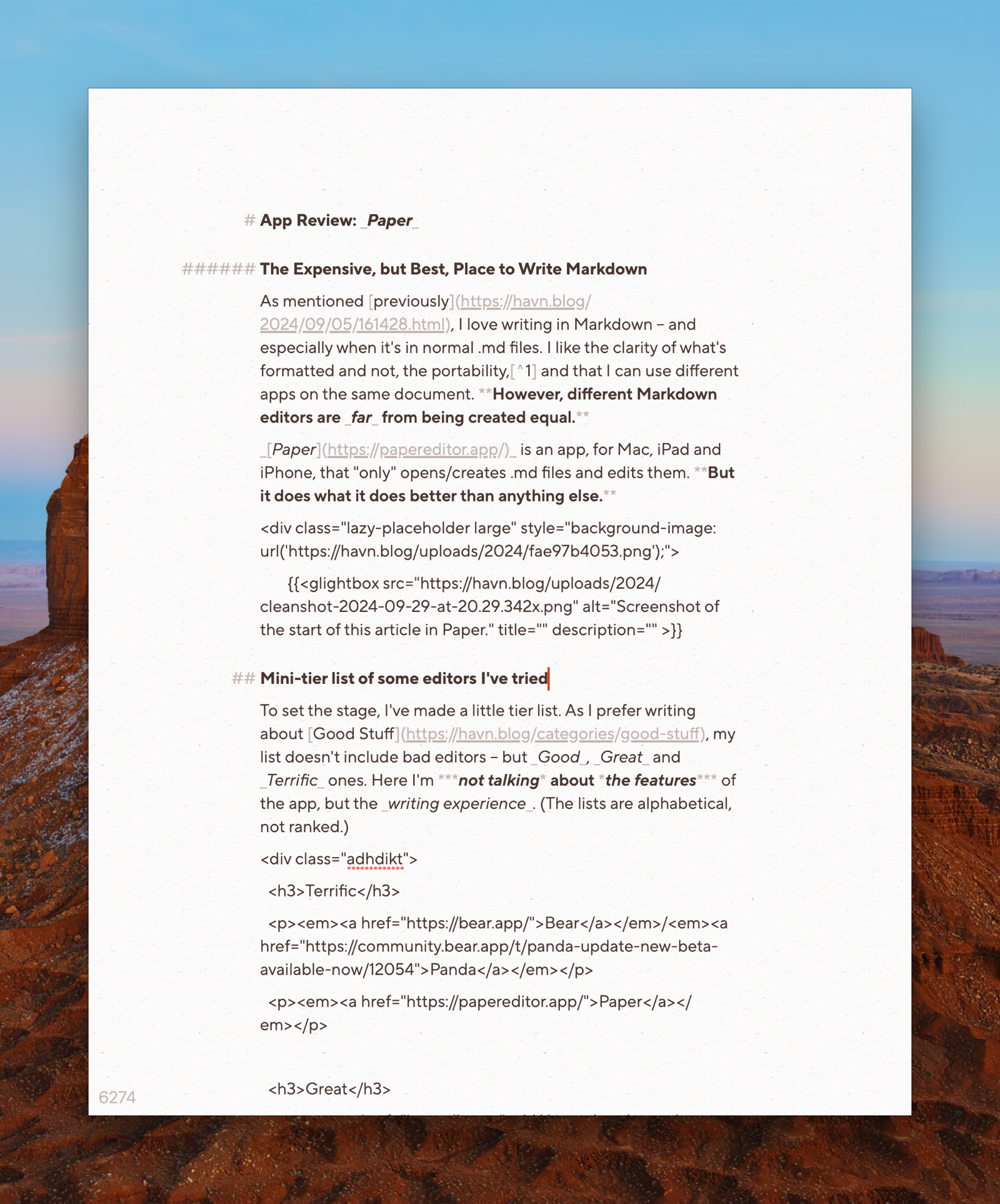
As mentioned previously, I love writing in Markdown – and especially when it’s in normal .md files. I like the clarity of what’s formatted and not, the portability,1 and that I can use different apps on the same document. However, different Markdown editors are far from being created equal.
Paper is an app, for Mac, iPad and iPhone, that “only” opens/creates .md files and edits them. But it does what it does better than anything else.
Paper could be an app for you, if:
- … you write a lot in Markdown – especially in short to medium lengths,
- … you don't mind (or even prefer) working with files instead of libraries,
- … you value the quality and feel of software, like $1.000 Japanese garden shears.
Mini-tier list of some editors I’ve tried
To set the stage, I’ve made a little tier list. As I prefer writing about Good Stuff, my list doesn’t include bad editors – but Good, Great and Terrific ones. Here I’m not talking about the features of the app, but the writing experience. (The lists are alphabetical, not ranked.)
There’s been plenty of memes about how long the team over at Shiny Frog spent on Bear 2.0. But holy croak, it shows – the editor is extremely polished. The app does have good export features, so your notes aren’t held hostage.2 But the main reason I, personally, don’t use it, is that the note files aren’t easily accessible to other apps. It also doesn’t have as robust publish features as Ulysses, or task/calendar system as NotePlan. However, as a general note-taker for Apple devices, I highly recommend Bear.3
Panda is the Bear editor as a stand-alone app, to simply open .md files – so it’s closer to Paper in terms of functionality. However, it’s not readily available for mobile, and isn’t technically a proper product at the moment.4

I don’t recommend my favourite pair of boots
I love my pair of Alden Indy Boots. I haven’t found a single boot I like the look of as much, and the last (being rather narrow at the back and wide in the front) fits my weird feet perfectly. However, I don’t generally recommend them – as they’re not technically “worth it”. They’re simply too expensive for what they are, as you can get better made shoes for the same price, or shoes of similar quality for less. But that doesn’t change the fact that I love them, and am happy I bought them!
I could say the same thing about my Filson Journeyman backpack: Is it too expensive? Yes. Do I still love it? Also yes.
Paper is in the same category: I won’t claim that it’s worth it – because it’s very expensive. But if you end up splurging for the app, you’ll get something terrific. Let me try to explain why.
The price for Paper varies from region to region, and the dev keeps experimenting. But it can be as much as €200! Personally I bought it after getting paid extra for a job I did – and at least the money went to a small indie dev. How much money people have to "waste" on nice stuff like this varies. So I'll focus on the good, and the bad, of the app – and then it's up to you to figure out if it could be worth it to you. It also has a 50% educational discount.
How I use Paper
As mentioned when talking about my default apps, I currently store my notes, blog posts, tasks, etc. in NotePlan. The app’s database is stored with CloudKit, but is still accessible by other apps. As I prefer writing in Paper, I will do that as much as possible, while jumping into NotePlan and Ulysses for stuff that those apps do better.5
For instance, I’ve made different shortcuts for creating a new general note or a new blog post. This creates a .md file that gets saved into the NotePlan database, and then opened in Paper.